
Lightspeed Internet
UX Documentation
Lightspeed Internet
UX Documentation
Play UX Audio
Play UX Audio
0:00/1:34
View UI
View UI

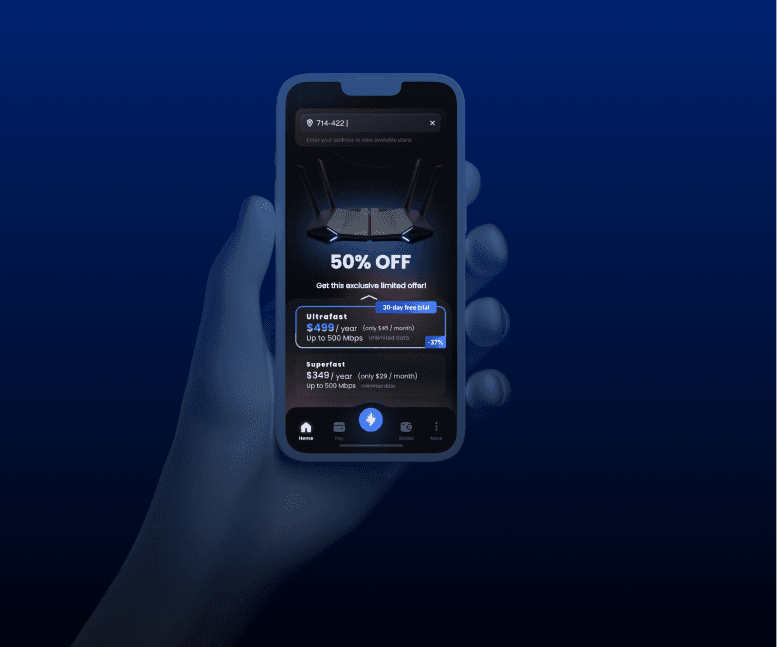
A dual-platform (web + mobile) service for Lightspeed customers to book internet installations and for technicians to manage appointments. Focuses on reducing abandoned jobs through verification steps, reminders, and clear user flows.
$1000/
Ideal for growing businesses that need more design support and personalized attention.

Documantation
Documantation
Documantation
Lightspeed is a fictional UK-based internet service provider offering fibre and broadband. The primary goal is to allow users to easily book installations while equipping technicians with the tools to efficiently carry out these jobs. This system encompasses both web and mobile interfaces for customers and a dedicated mobile application for technicians. This documentation aims to present a detailed analysis of the user experience (UX) for this product, based on the provided user flow diagram, design, and project context
Lightspeed is a fictional UK-based internet service provider offering fibre and broadband. The primary goal is to allow users to easily book installations while equipping technicians with the tools to efficiently carry out these jobs. This system encompasses both web and mobile interfaces for customers and a dedicated mobile application for technicians. This documentation aims to present a detailed analysis of the user experience (UX) for this product, based on the provided user flow diagram, design, and project context
Lightspeed is a fictional UK-based internet service provider offering fibre and broadband. The primary goal is to allow users to easily book installations while equipping technicians with the tools to efficiently carry out these jobs. This system encompasses both web and mobile interfaces for customers and a dedicated mobile application for technicians. This documentation aims to present a detailed analysis of the user experience (UX) for this product, based on the provided user flow diagram, design, and project context
1
✅ Objectives
The key objectives of the Lightspeed platform are to: Create a seamless booking experience for potential customers. Reduce abandoned technician jobs through improved information collection. Ensure clear communication between customers and technicians. Support technicians with comprehensive job information. Provide a scalable solution for installation scheduling.

1
✅ Objectives
The key objectives of the Lightspeed platform are to: Create a seamless booking experience for potential customers. Reduce abandoned technician jobs through improved information collection. Ensure clear communication between customers and technicians. Support technicians with comprehensive job information. Provide a scalable solution for installation scheduling.
1
✅ Objectives
The key objectives of the Lightspeed platform are to: Create a seamless booking experience for potential customers. Reduce abandoned technician jobs through improved information collection. Ensure clear communication between customers and technicians. Support technicians with comprehensive job information. Provide a scalable solution for installation scheduling.
2
🎯 Goals & Objectives
The main goals and objectives of the UX design for Lightspeed include: Simplify the customer booking experience. Minimize abandoned technician jobs. Ensure end-to-end visibility for both customers and staff. Make the platform usable across mobile and web devices. Support cancellations and reschedules gracefully.

2
🎯 Goals & Objectives
The main goals and objectives of the UX design for Lightspeed include: Simplify the customer booking experience. Minimize abandoned technician jobs. Ensure end-to-end visibility for both customers and staff. Make the platform usable across mobile and web devices. Support cancellations and reschedules gracefully.
2
🎯 Goals & Objectives
The main goals and objectives of the UX design for Lightspeed include: Simplify the customer booking experience. Minimize abandoned technician jobs. Ensure end-to-end visibility for both customers and staff. Make the platform usable across mobile and web devices. Support cancellations and reschedules gracefully.
3
👥 Target Users
The Lightspeed platform caters to two primary user groups: 1. Customers UK residents looking for high-speed broadband. Tech-aware but not always tech-savvy. Prefer clear instructions and instant confirmation. 2. Technicians Field service workers accessing the system via mobile. Need fast access to appointment, address, and property details. Value checklist-style interfaces and quick updates.

3
👥 Target Users
The Lightspeed platform caters to two primary user groups: 1. Customers UK residents looking for high-speed broadband. Tech-aware but not always tech-savvy. Prefer clear instructions and instant confirmation. 2. Technicians Field service workers accessing the system via mobile. Need fast access to appointment, address, and property details. Value checklist-style interfaces and quick updates.
3
👥 Target Users
The Lightspeed platform caters to two primary user groups: 1. Customers UK residents looking for high-speed broadband. Tech-aware but not always tech-savvy. Prefer clear instructions and instant confirmation. 2. Technicians Field service workers accessing the system via mobile. Need fast access to appointment, address, and property details. Value checklist-style interfaces and quick updates.
4
👥 Customer Persona
Name: Sarah Williams Age: 32 Occupation: Digital Marketing Manager Technical Proficiency: Moderate to High Goals: Get fast, reliable internet installed quickly Understand available service options clearly Minimize disruption during installation Avoid hidden costs or complications Pain Points: Difficulty comparing internet service options Uncertainty about installation process requirements Concerns about technician arrival times Previous bad experiences with vague installation windows

4
👥 Customer Persona
Name: Sarah Williams Age: 32 Occupation: Digital Marketing Manager Technical Proficiency: Moderate to High Goals: Get fast, reliable internet installed quickly Understand available service options clearly Minimize disruption during installation Avoid hidden costs or complications Pain Points: Difficulty comparing internet service options Uncertainty about installation process requirements Concerns about technician arrival times Previous bad experiences with vague installation windows
4
👥 Customer Persona
Name: Sarah Williams Age: 32 Occupation: Digital Marketing Manager Technical Proficiency: Moderate to High Goals: Get fast, reliable internet installed quickly Understand available service options clearly Minimize disruption during installation Avoid hidden costs or complications Pain Points: Difficulty comparing internet service options Uncertainty about installation process requirements Concerns about technician arrival times Previous bad experiences with vague installation windows
5
👥 Technician Persona
Name: James Cooper Age: 28 Experience: 4 years as Broadband Technician Technical Proficiency: High Goals: Complete jobs efficiently Have accurate information before arriving Manage daily schedule effectively Resolve customer issues during the first visit Pain Points: Arriving at jobs to find no one home Incomplete or inaccurate property information Special requirements discovered only upon arrival Difficulty accessing properties without prior instructions

5
👥 Technician Persona
Name: James Cooper Age: 28 Experience: 4 years as Broadband Technician Technical Proficiency: High Goals: Complete jobs efficiently Have accurate information before arriving Manage daily schedule effectively Resolve customer issues during the first visit Pain Points: Arriving at jobs to find no one home Incomplete or inaccurate property information Special requirements discovered only upon arrival Difficulty accessing properties without prior instructions
5
👥 Technician Persona
Name: James Cooper Age: 28 Experience: 4 years as Broadband Technician Technical Proficiency: High Goals: Complete jobs efficiently Have accurate information before arriving Manage daily schedule effectively Resolve customer issues during the first visit Pain Points: Arriving at jobs to find no one home Incomplete or inaccurate property information Special requirements discovered only upon arrival Difficulty accessing properties without prior instructions
6
🔁 User Flows
The user flows for customers, technicians, and the cancellation/rescheduling process are detailed below and visualized in the provided Mermaid format.

6
🔁 User Flows
The user flows for customers, technicians, and the cancellation/rescheduling process are detailed below and visualized in the provided Mermaid format.
6
🔁 User Flows
The user flows for customers, technicians, and the cancellation/rescheduling process are detailed below and visualized in the provided Mermaid format.
6
6
🔁 Technical Flows
Zoom In or Zoom Out by Mouse
7
🧭 Customer Booking Flow
Key Touchpoints: Address eligibility check: Customers enter their postcode/address to verify service availability. If the address is ineligible, an "Unavailable Message" is displayed. Package selection: Eligible customers are presented with available broadband packages. Slot selection: Customers choose a preferred installation date and time from an integrated calendar with slot highlighting. Disabled slots are visibly greyed out with tooltips (e.g., "Fully booked"). Form submission with property/infra/special notes: Customers fill out an installation details form, providing information on property access (gates, codes), existing hardware (BT socket, modem), and any special cases (elderly home, multi-floor building). Dynamic sections ensure only relevant information is requested. Final review and confirmation: A booking summary is presented for review, with "Edit" links beside each section. Reassurance copy (e.g., “You can cancel/reschedule any time”) is included with the final confirmation CTA. System triggers: Upon confirmation, the system processes the booking, sends a confirmation email/SMS immediately, stores the appointment, and schedules automated reminders. A reminder is sent 24 hours before the visit.

7
🧭 Customer Booking Flow
Key Touchpoints: Address eligibility check: Customers enter their postcode/address to verify service availability. If the address is ineligible, an "Unavailable Message" is displayed. Package selection: Eligible customers are presented with available broadband packages. Slot selection: Customers choose a preferred installation date and time from an integrated calendar with slot highlighting. Disabled slots are visibly greyed out with tooltips (e.g., "Fully booked"). Form submission with property/infra/special notes: Customers fill out an installation details form, providing information on property access (gates, codes), existing hardware (BT socket, modem), and any special cases (elderly home, multi-floor building). Dynamic sections ensure only relevant information is requested. Final review and confirmation: A booking summary is presented for review, with "Edit" links beside each section. Reassurance copy (e.g., “You can cancel/reschedule any time”) is included with the final confirmation CTA. System triggers: Upon confirmation, the system processes the booking, sends a confirmation email/SMS immediately, stores the appointment, and schedules automated reminders. A reminder is sent 24 hours before the visit.
7
🧭 Customer Booking Flow
Key Touchpoints: Address eligibility check: Customers enter their postcode/address to verify service availability. If the address is ineligible, an "Unavailable Message" is displayed. Package selection: Eligible customers are presented with available broadband packages. Slot selection: Customers choose a preferred installation date and time from an integrated calendar with slot highlighting. Disabled slots are visibly greyed out with tooltips (e.g., "Fully booked"). Form submission with property/infra/special notes: Customers fill out an installation details form, providing information on property access (gates, codes), existing hardware (BT socket, modem), and any special cases (elderly home, multi-floor building). Dynamic sections ensure only relevant information is requested. Final review and confirmation: A booking summary is presented for review, with "Edit" links beside each section. Reassurance copy (e.g., “You can cancel/reschedule any time”) is included with the final confirmation CTA. System triggers: Upon confirmation, the system processes the booking, sends a confirmation email/SMS immediately, stores the appointment, and schedules automated reminders. A reminder is sent 24 hours before the visit.
8
👷 Technician Appointment Flow
Technicians receive real-time job assignments via mobile push notification as soon as scheduled. They can access property and customer info on their mobile devices. This includes customer contact information, property specifics, and installation requirements. A checklist-based installation flow guides them through the steps. Technicians can provide a quick job status update post-installation through their mobile app. The app also features an emergency contact button and a customer no-show flag.

8
👷 Technician Appointment Flow
Technicians receive real-time job assignments via mobile push notification as soon as scheduled. They can access property and customer info on their mobile devices. This includes customer contact information, property specifics, and installation requirements. A checklist-based installation flow guides them through the steps. Technicians can provide a quick job status update post-installation through their mobile app. The app also features an emergency contact button and a customer no-show flag.
8
👷 Technician Appointment Flow
Technicians receive real-time job assignments via mobile push notification as soon as scheduled. They can access property and customer info on their mobile devices. This includes customer contact information, property specifics, and installation requirements. A checklist-based installation flow guides them through the steps. Technicians can provide a quick job status update post-installation through their mobile app. The app also features an emergency contact button and a customer no-show flag.
9
🔄 Rescheduling & Cancellation Flow
Customers can revisit the platform via confirmation links in their email/SMS. They can access seamless calendar revisit or cancellation confirmation options within the "Booking Management" section. The system ensures auto-sync with backend job slots upon rescheduling or cancellation.

9
🔄 Rescheduling & Cancellation Flow
Customers can revisit the platform via confirmation links in their email/SMS. They can access seamless calendar revisit or cancellation confirmation options within the "Booking Management" section. The system ensures auto-sync with backend job slots upon rescheduling or cancellation.
9
🔄 Rescheduling & Cancellation Flow
Customers can revisit the platform via confirmation links in their email/SMS. They can access seamless calendar revisit or cancellation confirmation options within the "Booking Management" section. The system ensures auto-sync with backend job slots upon rescheduling or cancellation.
10
📱 Platform Interfaces
Lightspeed platform is designed with both web and mobile interfaces in mind. Web & Mobile Views (Designed in Figma) Responsive design principles ensure all booking and management flows are mobile-friendly. The Web UI includes larger forms, more visible calendar slots, and summary panels. The Mobile UI features stacked layouts, touch-friendly interactions, and condensed steps. Simplified navigation via bottom tabs is considered for mobile.

10
📱 Platform Interfaces
Lightspeed platform is designed with both web and mobile interfaces in mind. Web & Mobile Views (Designed in Figma) Responsive design principles ensure all booking and management flows are mobile-friendly. The Web UI includes larger forms, more visible calendar slots, and summary panels. The Mobile UI features stacked layouts, touch-friendly interactions, and condensed steps. Simplified navigation via bottom tabs is considered for mobile.
10
📱 Platform Interfaces
Lightspeed platform is designed with both web and mobile interfaces in mind. Web & Mobile Views (Designed in Figma) Responsive design principles ensure all booking and management flows are mobile-friendly. The Web UI includes larger forms, more visible calendar slots, and summary panels. The Mobile UI features stacked layouts, touch-friendly interactions, and condensed steps. Simplified navigation via bottom tabs is considered for mobile.
Competitive Landscape Analysis (UX Focus)
Competitive
Landscape Analysis
(UX
Focus)
11
Starlink User Experience Analysis
The Starlink user experience begins with the Sign-up and Ordering Process, which emphasizes checking service availability through their website using a postcode or address. The process involves selecting a service plan, creating a new account (or using an existing one), and providing contact and billing information. Starlink highlights the option to activate a new device if purchased from a retailer. A key aspect is the communication of potential capacity limitations in certain areas, which may affect the ability to activate standard or priority plans. This transparency regarding service availability is important for setting user expectations. The Installation Process for Starlink is heavily focused on self-installation. They provide a mobile app that includes a tool to "Check for Obstructions," guiding users to find the best location for their satellite dish with a clear view of the sky. The setup is described as a simple two-step process: plug it in and point it at the sky. Instructions are provided both within the app and in the box with the equipment. While Starlink does not have authorized installers in many regions, they suggest using local contractors with relevant experience if needed. The emphasis on self-installation puts the onus on the user but is often praised for its simplicity. Account Management with Starlink is primarily handled through an online account portal and a mobile app. Users can manage their subscriptions, billing information, and access support resources through these interfaces. The app also allows users to monitor and configure their Starlink network and devices. Analysis of User Reviews and Usability Feedback reveals several common themes. Many users in rural areas, where traditional broadband options are limited, find Starlink to be a "game changer" providing significantly faster speeds and lower latency compared to previous satellite or DSL options. The self-installation process is generally considered easy to follow, aided by the mobile app. However, the high upfront equipment cost and monthly fees are frequently mentioned as drawbacks. Performance can be affected by weather conditions, particularly heavy rain or snow, leading to occasional service interruptions. Customer service is often cited as an area for improvement, with primary contact being an AI chatbot and limited options for reaching a human representative. Despite these drawbacks, overall satisfaction is high for users who previously had poor or no internet access.

11
Starlink User Experience Analysis
The Starlink user experience begins with the Sign-up and Ordering Process, which emphasizes checking service availability through their website using a postcode or address. The process involves selecting a service plan, creating a new account (or using an existing one), and providing contact and billing information. Starlink highlights the option to activate a new device if purchased from a retailer. A key aspect is the communication of potential capacity limitations in certain areas, which may affect the ability to activate standard or priority plans. This transparency regarding service availability is important for setting user expectations. The Installation Process for Starlink is heavily focused on self-installation. They provide a mobile app that includes a tool to "Check for Obstructions," guiding users to find the best location for their satellite dish with a clear view of the sky. The setup is described as a simple two-step process: plug it in and point it at the sky. Instructions are provided both within the app and in the box with the equipment. While Starlink does not have authorized installers in many regions, they suggest using local contractors with relevant experience if needed. The emphasis on self-installation puts the onus on the user but is often praised for its simplicity. Account Management with Starlink is primarily handled through an online account portal and a mobile app. Users can manage their subscriptions, billing information, and access support resources through these interfaces. The app also allows users to monitor and configure their Starlink network and devices. Analysis of User Reviews and Usability Feedback reveals several common themes. Many users in rural areas, where traditional broadband options are limited, find Starlink to be a "game changer" providing significantly faster speeds and lower latency compared to previous satellite or DSL options. The self-installation process is generally considered easy to follow, aided by the mobile app. However, the high upfront equipment cost and monthly fees are frequently mentioned as drawbacks. Performance can be affected by weather conditions, particularly heavy rain or snow, leading to occasional service interruptions. Customer service is often cited as an area for improvement, with primary contact being an AI chatbot and limited options for reaching a human representative. Despite these drawbacks, overall satisfaction is high for users who previously had poor or no internet access.
11
Starlink User Experience Analysis
The Starlink user experience begins with the Sign-up and Ordering Process, which emphasizes checking service availability through their website using a postcode or address. The process involves selecting a service plan, creating a new account (or using an existing one), and providing contact and billing information. Starlink highlights the option to activate a new device if purchased from a retailer. A key aspect is the communication of potential capacity limitations in certain areas, which may affect the ability to activate standard or priority plans. This transparency regarding service availability is important for setting user expectations. The Installation Process for Starlink is heavily focused on self-installation. They provide a mobile app that includes a tool to "Check for Obstructions," guiding users to find the best location for their satellite dish with a clear view of the sky. The setup is described as a simple two-step process: plug it in and point it at the sky. Instructions are provided both within the app and in the box with the equipment. While Starlink does not have authorized installers in many regions, they suggest using local contractors with relevant experience if needed. The emphasis on self-installation puts the onus on the user but is often praised for its simplicity. Account Management with Starlink is primarily handled through an online account portal and a mobile app. Users can manage their subscriptions, billing information, and access support resources through these interfaces. The app also allows users to monitor and configure their Starlink network and devices. Analysis of User Reviews and Usability Feedback reveals several common themes. Many users in rural areas, where traditional broadband options are limited, find Starlink to be a "game changer" providing significantly faster speeds and lower latency compared to previous satellite or DSL options. The self-installation process is generally considered easy to follow, aided by the mobile app. However, the high upfront equipment cost and monthly fees are frequently mentioned as drawbacks. Performance can be affected by weather conditions, particularly heavy rain or snow, leading to occasional service interruptions. Customer service is often cited as an area for improvement, with primary contact being an AI chatbot and limited options for reaching a human representative. Despite these drawbacks, overall satisfaction is high for users who previously had poor or no internet access.
12
Analysis of Other Broadband Service Providers
Examining the websites of other major broadband providers like Spectrum , CenturyLink , AT&T , Xfinity , and regional providers such as Surf Internet , Mercury Broadband , Metronet , altafiber , and Tachus reveals a mix of user experiences. Most providers allow customers to check service availability by entering their address on the homepage. The sign-up processes typically involve selecting a plan, providing personal and billing information, and scheduling installation. Many providers offer a choice between professional installation and self-install kits. Providers like Xfinity and Spectrum specifically mention easy self-installation. Customer satisfaction reports indicate that overall satisfaction with internet service providers can be relatively low. However, some providers consistently rank higher in specific areas. For instance, Verizon and Xfinity often receive high customer satisfaction scores. Fiber internet generally receives higher satisfaction ratings compared to cable or satellite. Reliability is a key factor for customer satisfaction, with providers like Spectrum and AT&T receiving high reliability scores in some reports. Price is also a significant concern for customers. T-Mobile 5G Home Internet is often highlighted as a budget-friendly option with good customer satisfaction. Customer service experiences vary widely across providers, with AT&T and T-Mobile earning top spots in some surveys. Common pain points include price increases, hidden fees, and the quality of customer support.

12
Analysis of Other Broadband Service Providers
Examining the websites of other major broadband providers like Spectrum , CenturyLink , AT&T , Xfinity , and regional providers such as Surf Internet , Mercury Broadband , Metronet , altafiber , and Tachus reveals a mix of user experiences. Most providers allow customers to check service availability by entering their address on the homepage. The sign-up processes typically involve selecting a plan, providing personal and billing information, and scheduling installation. Many providers offer a choice between professional installation and self-install kits. Providers like Xfinity and Spectrum specifically mention easy self-installation. Customer satisfaction reports indicate that overall satisfaction with internet service providers can be relatively low. However, some providers consistently rank higher in specific areas. For instance, Verizon and Xfinity often receive high customer satisfaction scores. Fiber internet generally receives higher satisfaction ratings compared to cable or satellite. Reliability is a key factor for customer satisfaction, with providers like Spectrum and AT&T receiving high reliability scores in some reports. Price is also a significant concern for customers. T-Mobile 5G Home Internet is often highlighted as a budget-friendly option with good customer satisfaction. Customer service experiences vary widely across providers, with AT&T and T-Mobile earning top spots in some surveys. Common pain points include price increases, hidden fees, and the quality of customer support.
12
Analysis of Other Broadband Service Providers
Examining the websites of other major broadband providers like Spectrum , CenturyLink , AT&T , Xfinity , and regional providers such as Surf Internet , Mercury Broadband , Metronet , altafiber , and Tachus reveals a mix of user experiences. Most providers allow customers to check service availability by entering their address on the homepage. The sign-up processes typically involve selecting a plan, providing personal and billing information, and scheduling installation. Many providers offer a choice between professional installation and self-install kits. Providers like Xfinity and Spectrum specifically mention easy self-installation. Customer satisfaction reports indicate that overall satisfaction with internet service providers can be relatively low. However, some providers consistently rank higher in specific areas. For instance, Verizon and Xfinity often receive high customer satisfaction scores. Fiber internet generally receives higher satisfaction ratings compared to cable or satellite. Reliability is a key factor for customer satisfaction, with providers like Spectrum and AT&T receiving high reliability scores in some reports. Price is also a significant concern for customers. T-Mobile 5G Home Internet is often highlighted as a budget-friendly option with good customer satisfaction. Customer service experiences vary widely across providers, with AT&T and T-Mobile earning top spots in some surveys. Common pain points include price increases, hidden fees, and the quality of customer support.
Competitive UX Feature Comparison
Competitive
UX Feature Comparison
| Feature | Lightspeed | Starlink | Spectrum | CenturyLink | AT&T |
|---|---|---|---|---|---|
| Service Availability Check | Yes | Yes | Yes | Yes | Yes |
| Self-Install Option | Yes (Implied) | Yes | Yes | Yes (Implied) | Yes (Implied) |
| Mobile App for Setup | Yes (Technician) | Yes | No | No | No |
| Account Management Portal | Yes (Implied) | Yes | Yes | Yes | Yes |
| Customer Support Channels | Email/Phone (Implied) | Chatbot, Online | Phone, Online | Phone, Online | Phone, Online |
13
🖼️ Key Screens Explained
Customer Interface (Web & Mobile) 1. Postcode Entry Screen: Features a smart postcode validator. Includes a “No service” fallback with an optional email alert for future availability. Encourages early exit from the flow if the user is ineligible. 2. Service & Slot Selection: Uses a card layout for available broadband packages. Integrates a calendar with slot highlighting. Disabled slots are visibly greyed out with tooltips (e.g., "Fully booked"). 3. Installation Info Form: Contains dynamic sections for access instructions (gates, codes), existing hardware (BT socket, modem), and special cases (elderly home, multi-floor building). Provides visual cues for required fields and helper text. 4. Review & Confirmation: Presents a booking summary in a clean accordion or card view with “Edit” links beside each section. Includes a final confirmation CTA with reassurance copy (e.g., “You can cancel/reschedule any time”). 5. Booking Management: Allows customers to access cancellation or reschedule options, typically through their online account or a link in their confirmation email.

13
🖼️ Key Screens Explained
Customer Interface (Web & Mobile) 1. Postcode Entry Screen: Features a smart postcode validator. Includes a “No service” fallback with an optional email alert for future availability. Encourages early exit from the flow if the user is ineligible. 2. Service & Slot Selection: Uses a card layout for available broadband packages. Integrates a calendar with slot highlighting. Disabled slots are visibly greyed out with tooltips (e.g., "Fully booked"). 3. Installation Info Form: Contains dynamic sections for access instructions (gates, codes), existing hardware (BT socket, modem), and special cases (elderly home, multi-floor building). Provides visual cues for required fields and helper text. 4. Review & Confirmation: Presents a booking summary in a clean accordion or card view with “Edit” links beside each section. Includes a final confirmation CTA with reassurance copy (e.g., “You can cancel/reschedule any time”). 5. Booking Management: Allows customers to access cancellation or reschedule options, typically through their online account or a link in their confirmation email.
13
🖼️ Key Screens Explained
Customer Interface (Web & Mobile) 1. Postcode Entry Screen: Features a smart postcode validator. Includes a “No service” fallback with an optional email alert for future availability. Encourages early exit from the flow if the user is ineligible. 2. Service & Slot Selection: Uses a card layout for available broadband packages. Integrates a calendar with slot highlighting. Disabled slots are visibly greyed out with tooltips (e.g., "Fully booked"). 3. Installation Info Form: Contains dynamic sections for access instructions (gates, codes), existing hardware (BT socket, modem), and special cases (elderly home, multi-floor building). Provides visual cues for required fields and helper text. 4. Review & Confirmation: Presents a booking summary in a clean accordion or card view with “Edit” links beside each section. Includes a final confirmation CTA with reassurance copy (e.g., “You can cancel/reschedule any time”). 5. Booking Management: Allows customers to access cancellation or reschedule options, typically through their online account or a link in their confirmation email.
14
Technician Interface (Mobile-First)
1. Daily Schedule: A list view showing job assignments by time and urgency, potentially with status indicators and an offline mode indicator. 2. Job Details: Provides access to maps, customer notes, and contact info. Includes an embedded map, customer contact shortcuts, and an installation checklist preview. 3. Verification: May include an address confirmation modal and a photo upload option for existing infrastructure. 4. On-site Actions: Features a step-by-step checklist and potential integration with a speed test tool. Includes “Start Job” → Checklist → “Mark Complete” workflow. 5. Completion: Offers a digital signature pad, a job report template, and potentially reschedule/cancel options. Also includes an emergency contact button and a customer no-show flag.

14
Technician Interface (Mobile-First)
1. Daily Schedule: A list view showing job assignments by time and urgency, potentially with status indicators and an offline mode indicator. 2. Job Details: Provides access to maps, customer notes, and contact info. Includes an embedded map, customer contact shortcuts, and an installation checklist preview. 3. Verification: May include an address confirmation modal and a photo upload option for existing infrastructure. 4. On-site Actions: Features a step-by-step checklist and potential integration with a speed test tool. Includes “Start Job” → Checklist → “Mark Complete” workflow. 5. Completion: Offers a digital signature pad, a job report template, and potentially reschedule/cancel options. Also includes an emergency contact button and a customer no-show flag.
14
Technician Interface (Mobile-First)
1. Daily Schedule: A list view showing job assignments by time and urgency, potentially with status indicators and an offline mode indicator. 2. Job Details: Provides access to maps, customer notes, and contact info. Includes an embedded map, customer contact shortcuts, and an installation checklist preview. 3. Verification: May include an address confirmation modal and a photo upload option for existing infrastructure. 4. On-site Actions: Features a step-by-step checklist and potential integration with a speed test tool. Includes “Start Job” → Checklist → “Mark Complete” workflow. 5. Completion: Offers a digital signature pad, a job report template, and potentially reschedule/cancel options. Also includes an emergency contact button and a customer no-show flag.
15
🔔 Notification Strategy
The platform employs the following notification strategy

15
🔔 Notification Strategy
The platform employs the following notification strategy
15
🔔 Notification Strategy
The platform employs the following notification strategy
| Action | Channel | Timing |
|---|---|---|
| Booking Confirmation | Email / SMS | Immediately |
| 24h Reminder | Email / SMS | 24 hours before visit |
| Job Assignment to Technician | Mobile Push | As soon as scheduled |
| Cancellation Confirmation | Immediately | |
| Reschedule Reminder | Email / SMS | 24 hours before new slot |
16
🧠 UX Principles Applied
Progressive Disclosure: Details like property infra and special access only show after core steps are done. Visual Clarity: Clean layout, spacing, and hierarchy to guide user focus. Error Tolerance: Built-in edge case handling (e.g., unserviceable postcode). Mobile-First Thinking: All screens and flows optimized for low-data mobile access.

16
🧠 UX Principles Applied
Progressive Disclosure: Details like property infra and special access only show after core steps are done. Visual Clarity: Clean layout, spacing, and hierarchy to guide user focus. Error Tolerance: Built-in edge case handling (e.g., unserviceable postcode). Mobile-First Thinking: All screens and flows optimized for low-data mobile access.
16
🧠 UX Principles Applied
Progressive Disclosure: Details like property infra and special access only show after core steps are done. Visual Clarity: Clean layout, spacing, and hierarchy to guide user focus. Error Tolerance: Built-in edge case handling (e.g., unserviceable postcode). Mobile-First Thinking: All screens and flows optimized for low-data mobile access.
17
⚠️ UX Pain Points Addressed
The Lightspeed platform aims to address the following key UX pain points

17
⚠️ UX Pain Points Addressed
The Lightspeed platform aims to address the following key UX pain points
17
⚠️ UX Pain Points Addressed
The Lightspeed platform aims to address the following key UX pain points
| Issue | Solution |
|---|---|
| Inaccurate job details | Structured info form, required fields, review page |
| No one home at visit | Multiple reminders, clear customer comms, live updates to technicians |
| Technician confusion on-site | Clear mobile interface, customer notes, checklist-based instructions |
| Abandonment due to eligibility | Early postcode check, eligibility screening before flow proceeds |
| Difficulty comparing options | Service comparison cards |
| Uncertainty about installation | Detailed information forms and clear communication |
| Concerns about arrival times | Reminders and potentially future ETA updates |
| Incomplete property info | Detailed forms with specific fields |
| Special requirements missed | Dedicated section in the installation details form |
| Difficulty accessing properties | Property access information field |
18
📌 Assumptions
The design and functionality of the Lightspeed platform are based on the following assumptions: Customers have basic internet literacy. Customers receive and respond to SMS/Email reminders. Technicians use company-issued mobile devices with access to the platform. Time slots reflect real-time availability via backend integration. Customers will provide accurate property access details upfront. Technicians have basic mobile literacy

18
📌 Assumptions
The design and functionality of the Lightspeed platform are based on the following assumptions: Customers have basic internet literacy. Customers receive and respond to SMS/Email reminders. Technicians use company-issued mobile devices with access to the platform. Time slots reflect real-time availability via backend integration. Customers will provide accurate property access details upfront. Technicians have basic mobile literacy
18
📌 Assumptions
The design and functionality of the Lightspeed platform are based on the following assumptions: Customers have basic internet literacy. Customers receive and respond to SMS/Email reminders. Technicians use company-issued mobile devices with access to the platform. Time slots reflect real-time availability via backend integration. Customers will provide accurate property access details upfront. Technicians have basic mobile literacy
19
🔧 Future Enhancements
Potential future enhancements for the Lightspeed platform include: Customer live chat support during booking. Technician GPS tracking for ETA updates. Real-time reschedule/cancellation triggers for backend availability. Voice assistant integration for accessibility. Integration with smart home setup assistance. AR-guided self-installation options. Predictive scheduling based on installation complexity. Customer portal for network management. Integration with customer service ticketing system.

19
🔧 Future Enhancements
Potential future enhancements for the Lightspeed platform include: Customer live chat support during booking. Technician GPS tracking for ETA updates. Real-time reschedule/cancellation triggers for backend availability. Voice assistant integration for accessibility. Integration with smart home setup assistance. AR-guided self-installation options. Predictive scheduling based on installation complexity. Customer portal for network management. Integration with customer service ticketing system.
19
🔧 Future Enhancements
Potential future enhancements for the Lightspeed platform include: Customer live chat support during booking. Technician GPS tracking for ETA updates. Real-time reschedule/cancellation triggers for backend availability. Voice assistant integration for accessibility. Integration with smart home setup assistance. AR-guided self-installation options. Predictive scheduling based on installation complexity. Customer portal for network management. Integration with customer service ticketing system.
20
♿ Accessibility Considerations
The Lightspeed platform aims for WCAG 2.1 AA compliance: Sufficient color contrast (minimum 4.5:1 for normal text). Keyboard navigable interface. Screen reader compatibility. Focus indicators for interactive elements. Alternative text for all images. Semantic HTML structure. Error messages linked to form fields. Descriptive button and link text. Proper heading hierarchy.

20
♿ Accessibility Considerations
The Lightspeed platform aims for WCAG 2.1 AA compliance: Sufficient color contrast (minimum 4.5:1 for normal text). Keyboard navigable interface. Screen reader compatibility. Focus indicators for interactive elements. Alternative text for all images. Semantic HTML structure. Error messages linked to form fields. Descriptive button and link text. Proper heading hierarchy.
20
♿ Accessibility Considerations
The Lightspeed platform aims for WCAG 2.1 AA compliance: Sufficient color contrast (minimum 4.5:1 for normal text). Keyboard navigable interface. Screen reader compatibility. Focus indicators for interactive elements. Alternative text for all images. Semantic HTML structure. Error messages linked to form fields. Descriptive button and link text. Proper heading hierarchy.
21
🧪 Usability Testing Plan
A usability testing plan is recommended to validate the design: 8.1 Testing Objectives Validate the booking flow completion rate. Assess the clarity of service package information. Measure time to complete booking process. Evaluate technician interface efficiency. 8.2 Testing Methodology Task-based testing: Specific scenarios for both customer and technician journeys. Think-aloud protocol: Users verbalize thoughts while completing tasks. Post-test questionnaires: SUS (System Usability Scale) assessment. A/B testing: For critical decision points in the flow. 8.3 Key Metrics Task completion rate. Time on task. Error rate. Satisfaction rating. Net Promoter Score (NPS).

21
🧪 Usability Testing Plan
A usability testing plan is recommended to validate the design: 8.1 Testing Objectives Validate the booking flow completion rate. Assess the clarity of service package information. Measure time to complete booking process. Evaluate technician interface efficiency. 8.2 Testing Methodology Task-based testing: Specific scenarios for both customer and technician journeys. Think-aloud protocol: Users verbalize thoughts while completing tasks. Post-test questionnaires: SUS (System Usability Scale) assessment. A/B testing: For critical decision points in the flow. 8.3 Key Metrics Task completion rate. Time on task. Error rate. Satisfaction rating. Net Promoter Score (NPS).
21
🧪 Usability Testing Plan
A usability testing plan is recommended to validate the design: 8.1 Testing Objectives Validate the booking flow completion rate. Assess the clarity of service package information. Measure time to complete booking process. Evaluate technician interface efficiency. 8.2 Testing Methodology Task-based testing: Specific scenarios for both customer and technician journeys. Think-aloud protocol: Users verbalize thoughts while completing tasks. Post-test questionnaires: SUS (System Usability Scale) assessment. A/B testing: For critical decision points in the flow. 8.3 Key Metrics Task completion rate. Time on task. Error rate. Satisfaction rating. Net Promoter Score (NPS).
22
🛠️ Implementation Recommendations
9.1 Technical Requirements Responsive front-end framework (React.js recommended). Real-time availability checking. Integration with calendar/scheduling system (e.g., Google Calendar for technicians). Secure customer data handling (PCI-DSS compliance for payment gateways). Offline capability for technician app with sync status badge and auto-save for edits when online. APIs for postcode validation (Google Maps API + Lightspeed coverage database). 9.2 Phased Implementation A phased implementation approach is suggested: 1. Phase 1: Core booking flow and availability checking. 2. Phase 2: Technician mobile application. 3. Phase 3: Automated notifications and reminders. 4. Phase 4: Customer booking management (cancellations/rescheduling). 5. Phase 5: Analytics and optimization. 9.3 Critical Success Factors Availability accuracy: Real-time service area checking. Information completeness: Collecting all necessary installation details. Reminder effectiveness: Reducing no-show appointments. Technician preparation: Comprehensive job information availability.

22
🛠️ Implementation Recommendations
9.1 Technical Requirements Responsive front-end framework (React.js recommended). Real-time availability checking. Integration with calendar/scheduling system (e.g., Google Calendar for technicians). Secure customer data handling (PCI-DSS compliance for payment gateways). Offline capability for technician app with sync status badge and auto-save for edits when online. APIs for postcode validation (Google Maps API + Lightspeed coverage database). 9.2 Phased Implementation A phased implementation approach is suggested: 1. Phase 1: Core booking flow and availability checking. 2. Phase 2: Technician mobile application. 3. Phase 3: Automated notifications and reminders. 4. Phase 4: Customer booking management (cancellations/rescheduling). 5. Phase 5: Analytics and optimization. 9.3 Critical Success Factors Availability accuracy: Real-time service area checking. Information completeness: Collecting all necessary installation details. Reminder effectiveness: Reducing no-show appointments. Technician preparation: Comprehensive job information availability.
22
🛠️ Implementation Recommendations
9.1 Technical Requirements Responsive front-end framework (React.js recommended). Real-time availability checking. Integration with calendar/scheduling system (e.g., Google Calendar for technicians). Secure customer data handling (PCI-DSS compliance for payment gateways). Offline capability for technician app with sync status badge and auto-save for edits when online. APIs for postcode validation (Google Maps API + Lightspeed coverage database). 9.2 Phased Implementation A phased implementation approach is suggested: 1. Phase 1: Core booking flow and availability checking. 2. Phase 2: Technician mobile application. 3. Phase 3: Automated notifications and reminders. 4. Phase 4: Customer booking management (cancellations/rescheduling). 5. Phase 5: Analytics and optimization. 9.3 Critical Success Factors Availability accuracy: Real-time service area checking. Information completeness: Collecting all necessary installation details. Reminder effectiveness: Reducing no-show appointments. Technician preparation: Comprehensive job information availability.
23
📊 Analytics and Measurement
Key Performance Indicators (KPIs) to track include: Conversion rate (website visitors to bookings). Abandonment rate (at each step of the booking funnel). Technician first-time resolution rate. Customer satisfaction score. Rescheduling/cancellation rate. Tracking implementation should involve event-based analytics, heatmaps, form field abandonment tracking, customer feedback collection points, and post-installation satisfaction surveys. Integrating analytics to track drop-off points in the booking flow is also recommended.

23
📊 Analytics and Measurement
Key Performance Indicators (KPIs) to track include: Conversion rate (website visitors to bookings). Abandonment rate (at each step of the booking funnel). Technician first-time resolution rate. Customer satisfaction score. Rescheduling/cancellation rate. Tracking implementation should involve event-based analytics, heatmaps, form field abandonment tracking, customer feedback collection points, and post-installation satisfaction surveys. Integrating analytics to track drop-off points in the booking flow is also recommended.
23
📊 Analytics and Measurement
Key Performance Indicators (KPIs) to track include: Conversion rate (website visitors to bookings). Abandonment rate (at each step of the booking funnel). Technician first-time resolution rate. Customer satisfaction score. Rescheduling/cancellation rate. Tracking implementation should involve event-based analytics, heatmaps, form field abandonment tracking, customer feedback collection points, and post-installation satisfaction surveys. Integrating analytics to track drop-off points in the booking flow is also recommended.
Ready to elevate your brand? Schedule a call to discuss your project and discover how we can bring your vision to life.
Ready to elevate your brand? Schedule a call to discuss your project and discover how we can bring your vision to life.
Ready to elevate your brand? Schedule a call to discuss your project and discover how we can bring your vision to life.